Trending cricket AI videos are gaining attention on social media platforms such as Instagram Reels, YouTube Shorts, and Facebook. These videos combine artificial intelligence, realistic movements, cinematic visuals, and exciting cricket scenes to create engaging short-form content. From powerful batting shots to village cricket moments, AI tools allow creators to turn simple ideas into impressive video clips without professional cameras or complicated editing software.
The popularity of Trending Cricket AI Video Prompts has made it easier for beginners to experiment with different cricket scenes. By entering a detailed text prompt into a compatible AI video generator, users can create videos featuring cricket players, stadiums, batting actions, and creative sports scenarios.
If you want to learn how to create a Viral Cricket AI Video in 2026, this guide explains the tools you need, provides ready-to-copy prompts, and shares practical tips for improving your final video.
What Do You Need to Create a Cricket AI Video?
Before creating your first video, choose an AI video generator that supports text-to-video or image-to-video features. Text-to-video tools generate footage from written instructions, while image-to-video tools animate a reference picture.
You will also need a clear Cricket AI Video Prompt describing the characters, cricket action, environment, camera angle, lighting, and video style. The more clearly you describe the scene, the easier it is to guide the AI toward your desired result.
Here are the basic requirements:
- An AI video generator with suitable video creation features.
- A detailed cricket video prompt.
- A reference image, if required by your chosen tool.
- A video editing application such as CapCut.
- Suitable music, sound effects, and captions for the final edit.
These tools can help you produce cricket-themed videos for social media, entertainment pages, and personal creative projects.
Cricket AI Video Prompt Copy Paste
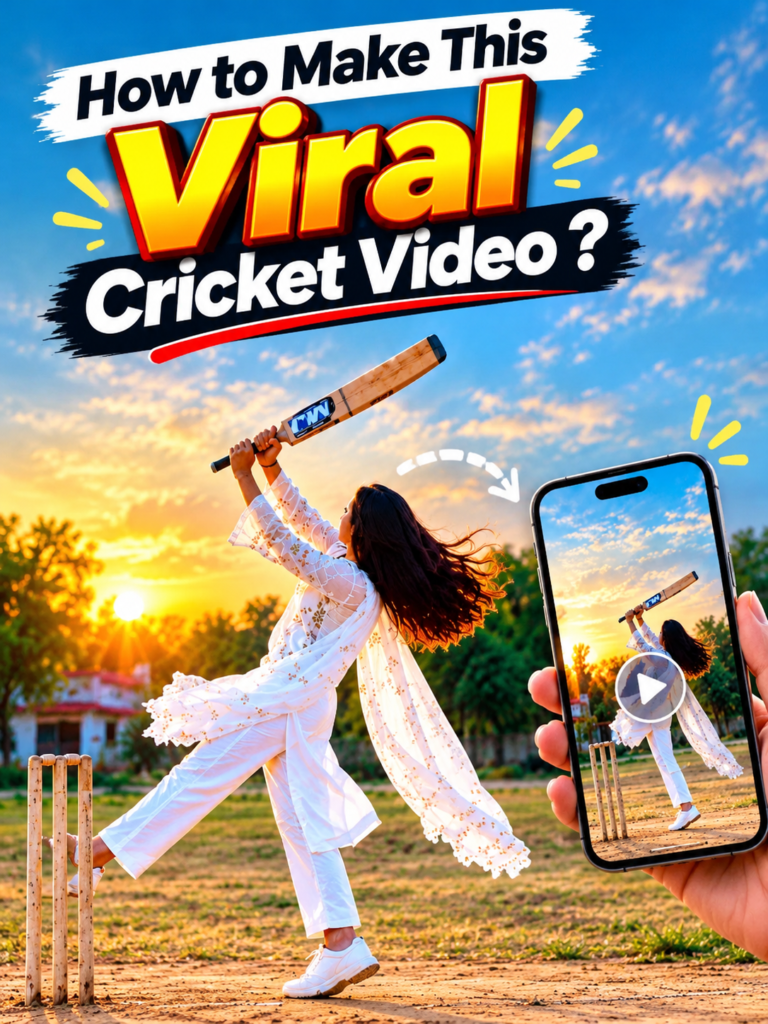
Use the following ready-to-copy prompt to generate a realistic village cricket video featuring a young Indian woman playing a cricket shot. The prompt describes the character, environment, movements, and camera style to help maintain visual consistency.
Video Prompt
Create an ultra-realistic cinematic video matching the provided reference video as closely as possible. Vertical 9:16 aspect ratio, 4K quality, natural lighting, realistic human movements, and a continuous single camera shot.

Scene and Character: A young Indian woman wearing a beautiful white embroidered salwar kameez, matching white trousers, and a lightweight white dupatta. Her long, dark hair is tied back. She is standing on a flat, dusty cricket ground in a rural Indian village. Three cricket stumps are placed beside her on the left side of the frame. In the background, there are green trees, a small rural building, an open field, and a pale cloudy evening sky.

ACTION — SECOND BY SECOND:

0–2 seconds: The woman stands beside the cricket stumps, holding a wooden cricket bat with both hands. She bends forward slightly and looks toward the expected direction of the cricket ball. Her posture is focused and natural.

2–4 seconds: She prepares to play a cricket shot, adjusting her stance and bringing the bat upward. Her white dupatta hangs naturally and moves gently with her body.

4–6 seconds: She swings the cricket bat upward with both hands, turning her body naturally. One leg rises as she performs an energetic batting follow-through. Her long hair and white dupatta flow naturally with the movement.

6–8 seconds: She continues the batting action, lifting the bat high above her shoulder and briefly balancing on one foot. Her movements resemble the reference video, with realistic body weight and natural cloth physics.

8–10 seconds: She brings the bat down in front of her, steps forward, and finishes the movement. She turns slightly toward the camera with a relaxed facial expression while standing on the cricket pitch.

CAMERA AND VISUAL STYLE: Fixed camera position, full-body wide shot, eye-level perspective, the woman visible from head to toe throughout the video. Keep the cricket stumps visible on the left. No cuts, no camera shakes, no sudden zooms, and no scene transitions. Soft natural daylight, realistic shadows, natural skin texture, detailed white fabric embroidery, realistic hair movement, and authentic rural Indian surroundings.

IMPORTANT CONSISTENCY RULES: Maintain the same woman's face, hairstyle, white outfit, cricket bat, body proportions, background, and camera angle throughout the entire video. Make the action continuous, physically believable, and as close to the reference footage as possible. Do not add a visible cricket ball unless it is present in the reference.

NEGATIVE PROMPT: Cartoon, animation, unrealistic movements, extra fingers, deformed hands, distorted face, duplicate person, extra cricket bats, floating objects, changing clothes, changing background, incorrect cricket stumps, flickering, unnatural body movement, camera cuts, artificial lighting, text, subtitles, logos, and watermarks.
How to Create a Trending Cricket AI Video Step by Step
Follow these simple steps to create your own AI-generated cricket clip.
Step 1: Choose an AI Video Generator
Open an AI video creation tool that supports text-to-video or image-to-video generation. Check whether it offers the video duration, aspect ratio, and quality settings you need.
Step 2: Copy the Cricket AI Prompt
Choose a prompt that matches your idea. You can use the village cricket prompt above or customize it for a professional stadium, a powerful batting shot, a bowling action, or a cricket celebration.
Step 3: Enter the Prompt
Paste your prompt into the generator’s text box. If the tool supports reference images, upload an appropriate image to guide the character’s appearance or scene composition.
Step 4: Adjust the Video Settings
Select a vertical 9:16 aspect ratio for Instagram Reels and YouTube Shorts. Choose a suitable duration and quality based on the available options. Some generators may use different settings or have limits on free generations.
Step 5: Generate and Review the Video
Start the generation process and wait for the video to finish. Watch the result carefully and check the cricket action, player movements, background details, and camera consistency.
If the video contains distorted hands, unusual bat movements, or inconsistent clothing, simplify the prompt and try again.
Step 6: Download the Final Clip
Once you are happy with the result, export or download the video using the options provided by your chosen tool. You can then move to the editing stage.
Professional Cricket AI Video Prompt for Stadium Scenes
If you prefer international cricket action instead of a village cricket scene, try this alternative prompt.
Prompt: Create a realistic cinematic cricket video inside a packed international cricket stadium during an exciting match. A professional batter wearing a cricket helmet, gloves, pads, and a realistic team uniform stands ready at the crease. The bowler runs toward the batter and delivers the ball with natural athletic movement. The batter plays a powerful shot, sending the ball high toward the boundary as the crowd reacts with excitement.
Show realistic cricket equipment, believable player movements, detailed stadium lighting, a lively audience, natural shadows, and smooth sports cinematography. Use a combination of a wide stadium view and controlled cinematic tracking that keeps the main action visible. Maintain consistent player appearances and realistic ball movement throughout the clip. Use vertical 9:16 framing suitable for short-form social media videos. Avoid distorted anatomy, unrealistic equipment, unnecessary text, logos, and watermarks.
This AI Cricket Video Generator Prompt is a starting point. You can modify the scene to create batting highlights, bowling videos, cricket practice clips, or dramatic stadium moments.
Tips to Make Your Cricket AI Video More Realistic
Creating an impressive AI cricket video requires more than simply entering a prompt. Small improvements to the instructions and editing process can make a noticeable difference.
- Describe one main action: Focus on a single batting shot, bowling delivery, or celebration rather than combining too many unrelated scenes.
- Maintain character consistency: Repeat important details about clothing, hairstyle, equipment, and surroundings when necessary.
- Use vertical framing: A 9:16 aspect ratio works well for most short-form video platforms.
- Avoid complicated movements: Simple, continuous actions are often easier for AI tools to reproduce convincingly.
- Improve the sound: Add suitable cricket ambience, bat impact effects, or music that matches the action.
- Check the final output: Look for distorted objects, unnatural body movements, flickering, and visual inconsistencies before publishing.
For better results, experiment with different prompt descriptions while keeping the central cricket action unchanged.
How to Edit and Upload Your Cricket AI Video
After generating the clip, open CapCut or another compatible video editing application and import your footage. Trim unnecessary sections, remove awkward frames where possible, and align the most exciting moment with the background music or cricket sound effects.
You can adjust brightness, contrast, and color slightly to give the video a polished appearance. Add a short title or caption if it helps viewers understand the scene, but avoid covering important parts of the action.
Export the finished video in a format supported by your chosen platform. Write a relevant caption and use a few descriptive hashtags, such as #CricketAI, #CricketVideo, #AIVideoPrompt, #CricketReels, and #AIEditing.
Remember that no prompt can guarantee viral results. Originality, video quality, audience interest, and platform distribution all influence how a post performs. If your footage realistically depicts an event that never happened, consider labeling it as AI-generated to avoid misleading viewers.
Conclusion
Creating a trending cricket AI video is an accessible way to experiment with sports content and cinematic storytelling. With a clear Cricket AI Video Prompt, a suitable video generator, and a few editing improvements, beginners can produce cricket-themed clips for Instagram Reels, YouTube Shorts, and other social media platforms.
Start with a simple batting or bowling scene, review the generated footage, and improve the prompt whenever necessary. Focus on realistic movements, consistent visuals, suitable sound, and original ideas to make your cricket videos more engaging.
Frequently Asked Questions (FAQs)
1. What is a Trending Cricket AI Video?
A trending cricket AI video is a cricket-themed clip created or enhanced using artificial intelligence. It may show realistic batting, bowling, stadium action, or creative cricket scenes.
2. How Can I Create a Cricket AI Video for Free?
You can try an AI video generator that offers free credits or a free usage tier. Availability, export quality, and generation limits vary by platform.
3. Which Prompt Is Best for Cricket AI Videos?
A useful prompt clearly describes the character, cricket action, location, camera angle, lighting, video duration, and visual style. Keeping the main action simple can improve consistency.
4. Can I Make Cricket AI Videos on My Phone?
Yes. You can use a compatible AI video generator through a mobile browser or application and then edit the downloaded clip on your smartphone.
5. What Is the Best Video Ratio for Cricket Reels?
Vertical 9:16 framing is generally suitable for Instagram Reels and YouTube Shorts. Keep the main subject centered and ensure important cricket action remains visible.
6. Why Does My AI Cricket Video Look Unrealistic?
AI generators may struggle with fast movements, cricket equipment, hands, faces, and ball physics. Try simplifying the prompt, shortening the action, or generating another version.
7. Can I Upload AI Cricket Videos to Instagram and YouTube?
You can generally publish AI-generated videos if they comply with the platform’s policies and applicable laws. Follow any relevant AI-content disclosure requirements, and ensure you have the necessary rights to music, images, and other assets.